Friend-to-friend ZFS backups, version two
Giving a friend a quota-capped corner of my pool, without a VM or a shell
Two years ago I wrote about friend-to-friend backups with TrueNAS. A friend and I store each other’s ZFS snapshots, which is the cheapest off-site backup there is. TrueNAS’s replication tasks wanted root on the receiving system, and neither of us wanted to give the other root on the machine that holds our family photos. So each of us ran a TrueNAS VM on a hypervisor, backed by an iSCSI zvol on the real NAS, and gave the other person root inside that VM instead. Sounds complicated? It was. It worked, but it meant running ZFS on a zvol on ZFS, inside a VM that each of us had to keep updated.
Since then I replaced TrueNAS with NixOS, and my friend plans to move his machines to NixOS too.
This time we looked for the simplest solution, built from standard Linux and ZFS features wherever possible.
He wanted plain zfs send and zfs receive, with his data still encrypted and his keys never on my server.
I agreed, on one condition: neither of us should be able to destroy the other’s datasets.
The result is zfs-tenant, which is now on PyPI and has documentation.
Table of Contents
Why ZFS #
OpenZFS is a filesystem and a volume manager in one. You add disks to a pool, and it behaves like one large partition: every dataset you create draws from the same free space, and each can still have its own quota and encryption. ZFS checksums every block it writes, so it notices when a disk hands back something else, and with a mirror or RAIDZ it repairs the block from a good copy. That protection costs disk space: a mirror of two disks holds one disk’s worth of data.
For me, snapshots are one of the coolest parts.
ZFS never overwrites data in place, so a snapshot only has to hold on to the blocks that existed at that moment.
Taking one is instant, and it costs no space until the data changes.
zfs send turns a snapshot, or the difference between two snapshots, into a stream that zfs receive writes into a pool on another machine, usually piped through SSH.
It moves blocks, not files: an incremental send contains only the blocks that changed, and ZFS knows which ones those are without visiting a single file.
A bajillion one-kilobyte files do not slow it down, because nothing has to look at them one by one.
For comparison, restic on my PC needed an hour and a half per run just to check close to a hundred million files for changes.
Two tools from the same project automate this.
sanoid takes snapshots on a schedule and prunes them by policy, for example hourly ones for a day and daily ones for a month.
syncoid wraps zfs send and zfs receive over SSH: it finds the newest snapshot both sides share and sends everything after it.
What we wanted #
We wrote down the rules before anything else:
- He cannot see any of my data, including metadata like dataset names and sizes.
- He cannot change or destroy anything of mine.
- I cannot read his data, because his keys stay at his house.
- He gets one dataset where he can create and remove nested datasets as he likes.
- That dataset has a size limit.
- No new replication tool on either side: plain
zfs sendor syncoid.
Until then his NAS runs TrueNAS, so whatever I built also had to work on a machine without NixOS.
ZFS already had most of it #
OpenZFS has a permission system that most people never touch: zfs allow.
It delegates individual operations like receive, create, and destroy on one dataset to an unprivileged user.
Put a root-owned quota on that dataset and the user cannot store more than you agreed.
Raw sends (zfs send -w) ship the encrypted blocks as they are, so the receiving side never needs the key.
On paper, that covers five of the six rules.
The gap is visibility.
Any local user can run zfs list and see every dataset on the machine, with names, sizes, and properties.
And an SSH account for replication is, by default, also a shell.
There are tools that would sidestep some of this.
zrepl has a sink mode with a subtree per client, but it replaces sanoid and syncoid on both sides and runs as root on the receiver.
restic or borg to a friend’s box would also work, but everything else on my network is ZFS: my machines replicate to the NAS with syncoid, and a restore is zfs send and zfs receive.
Adding another backup format means one more thing to understand when something breaks.
My current off-site copy goes to Backblaze B2 with rclone.
Ideally that would be ZFS as well, and some hosting services accept zfs send, but they cost far more than object storage.
A friend with a ZFS box costs nothing.
Rehearsing the permissions in a VM #
Before writing any code, I had an agent build a throwaway NixOS VM test with a real pool, a delegated user, and a list of probes. Each probe tried one thing the friend should not be able to do and recorded what ZFS answered.
The first surprise came from the most obvious setup.
With a plain zfs allow -u joe create,receive,destroy,... tank/friends/joe, the delegated user could run zfs destroy -r tank/friends/joe and delete the dataset I had created for him, quota included.
Delegated rights apply to the dataset itself as well as everything below it, unless you say otherwise.
The fix is to split them: on the root itself only create,mount,receive with zfs allow -l, and the full set only for descendants with zfs allow -d.
After that change, destroying, snapshotting, re-delegating, or changing the quota of the root all failed with permission denied.
A send stream can carry properties too, such as a hostile mountpoint=/etc.
ZFS applies them with the receiving user’s rights, so in the VM that property failed with permission denied.
The probes also confirmed the gap: the delegated user saw my tank/host dataset in zfs list, and zfs get used tank/host returned its size.
A gate that speaks syncoid #
The shell part has a standard answer.
An authorized_keys line with restrict,command="..." runs one fixed program for every login, and passes whatever the client asked for in SSH_ORIGINAL_COMMAND.
zfs-tenant gate is that program.
It tokenizes the request, accepts only the handful of command shapes a backup needs, checks that every dataset name is inside the friend’s dataset, and runs zfs with an argument list it builds itself.
It never starts a shell, so there is nothing to inject into.
The hard part was knowing exactly which commands syncoid sends, so an agent read syncoid’s Perl and logged every remote command it ran.
Most are the zfs commands you would expect.
One surprise: before each receive, syncoid runs ps -Ao args= on the receiving machine, to check that no other transfer is already writing to the same dataset.
That command prints every running process with its full command line.
On my NAS, it would show my friend everything I run, so the gate answers with an empty list.
Reading syncoid that closely also turned up a remote code execution (RCE) bug in version 2.3.0, outside zfs-tenant itself. In push mode, syncoid asks the receiving host for a ZFS resume token. It passed that answer unescaped into shell commands for estimating and resuming the send, which run on the source machine. A malicious or compromised backup host could therefore return shell syntax instead of a token and execute arbitrary commands on the sender with the privileges of the syncoid process.
I reproduced this in two isolated NixOS VMs using real ZFS and SSH: a harmless command embedded in the receiver’s answer created a marker file on the sender.
I reported it to the maintainer and opened sanoid PR #1114 with a small fix that shell-quotes the token at both uses.
Even with that fix, the sending side should run syncoid as an unprivileged user that may only send and hold.
nixpkgs’ services.syncoid already works that way, so my friend needs nothing from zfs-tenant at all.
Zones: a second wall in the kernel #
At that point the gate was the only thing hiding my datasets. Then my friend sent me a message: ZFS has a feature called zones, which restricts a dataset tree to a Linux user namespace.
zfs zone attaches a dataset to one user namespace, and inside that namespace the ZFS kernel module answers dataset does not exist for everything that is not attached.
Even if my gate had a bug that let arbitrary zfs commands through, tank/host would stay invisible.
The zone does not replace the gate, though: it only filters ZFS, and it only applies once the gate has put the SSH session inside it.
Who stops what shows how the two divide the work.
A user namespace can give its processes different user IDs than they have outside.
Containers usually use that to make the user root inside the namespace, while it stays an ordinary user outside.
ZFS treats root inside a zone as the zone’s administrator, allowed to do anything to the attached datasets, whatever zfs allow says.
In the VM test, that let the friend destroy the dataset I had created for him.
So zfs-tenant keeps him as his own ordinary user inside the namespace: he has no special rights there, zfs allow decides what he may do, and the kernel still hides everything else.
Root inside a user namespace also turned up in a real OpenZFS bug in August: before 2.4.4, 2.3.9, and 2.2.11, several pool operations, such as destroying a pool, accepted it as host root (CVE-2026-79619).
Joe cannot reach that through the gate, but zfs-tenant needs unprivileged user namespaces, so a host running it should load a patched module: cat /sys/module/zfs/version shows the loaded one, which only changes after a reboot.
A zone needs a running namespace to attach to, so zfs-tenant runs a small service per friend that holds one. The gate joins that namespace before it looks at the command, drops the capabilities that joining grants, and refuses to run if the service is down.
Who stops what #
When Joe and I talked it through, I found it hard to say clearly which part protects against what, so I made this diagram.
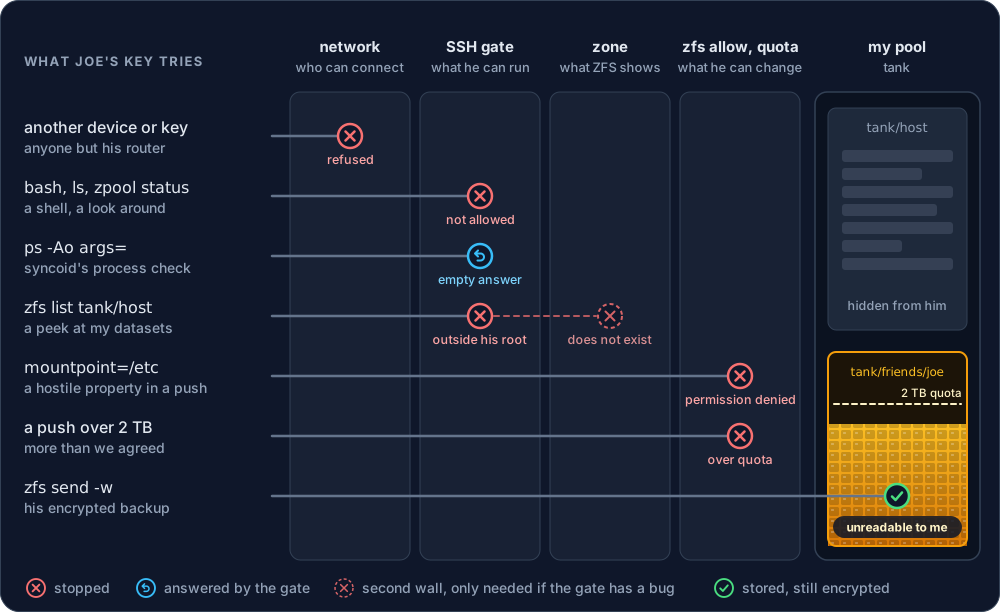
Each column answers one question: who can connect, what he can run, what ZFS shows him, and what he can change.
For the network, our tailnet only lets his router reach port 22 on my NAS, and from= in authorized_keys only accepts his key from that address.
Raw sends then keep whatever reaches my pool unreadable to me.
The gate and the zone overlap in one job: hiding my other datasets.
The gate does it first, by refusing any name outside his root before zfs runs.
The zone repeats that check in the kernel, so hiding my datasets would take a bug in both.
Everything else the gate does, the zone cannot:
- Without the gate, his key would be a normal account on my NAS. The zone only filters ZFS; it would not stop him from reading
/etcor running programs. - An SSH login does not start inside a user namespace. The gate joins the zone before it runs anything, so without the gate the zone would never apply.
- The zone leaves some things visible:
zpool statusstill shows my disks and how full the pool is, and the datasets above his root still show their sizes. User namespaces do not hide processes either, hence the empty answer tops. - It deletes any unencrypted dataset he pushes by mistake, so I never keep his plaintext.
- It logs every command, which is how I saw Joe try
bashbelow.
The security model in the documentation lists every promise with the mechanism behind it.
What it cannot hide #
ZFS encryption protects file contents, not structure.
In the words of zfs-load-key(8), ZFS “will not encrypt metadata related to the pool structure, including dataset and snapshot names, dataset hierarchy, properties, file size, file holes, and deduplication tables.”
So I can see the names, sizes, and snapshot times of whatever my friend sends me.
Boring dataset names help, and sending without -p keeps properties out of the stream.
I can also always delete his copy, because I am root on my own machine. What I can never do is read it. My monthly scrubs still verify his data without his key, because ZFS checksums the encrypted blocks.
What we protect against is a dead machine: a failed pool, a fire, a flood. His key may destroy anything below his root, which is what lets syncoid mirror his snapshot retention, so someone who steals that key can also delete his backups on my NAS. Covering that would take holds that I place as root and release on a schedule. We left them out on purpose, although I am reconsidering.
Setting it up #
On a NixOS host, giving a friend space takes this:
services.zfs-tenant = {
  enable = true;
  tenants.joe = {
    dataset = "tank/friends/joe";
    quota = "2T";
    authorizedKeys = [ "ssh-ed25519 AAAAC3NzaC1lZDI1NTE5AAAA... joe-nas" ];
    allowedFrom = [ "100.64.0.12" ];  # his tailnet address
  };
};
That creates the user, pins the key to the gate, applies the dataset, properties, and delegation on every boot, and runs the zone service.
My own setup is in friend-backups.nix, with his real key and address.
If your sanoid snapshots the whole pool, exclude the tenant tree: your sanoid must neither snapshot nor prune it, or his next incremental push finds snapshots on the target that he never sent.
Once my friend is on NixOS, he can push with nixpkgs’ own module:
programs.ssh.knownHosts.bas-nas.publicKey = "ssh-ed25519 AAAAC3NzaC1lZDI1NTE5AAAA...";

services.syncoid = {
  enable = true;
  sshKey = "/var/lib/syncoid/id_ed25519";
  localSourceAllow = [ "send" "hold" ];
  commonArgs = [
    "--no-sync-snap"
    "--compress=none"
    "--delete-target-snapshots"
    "--sshoption=StrictHostKeyChecking=yes"
  ];
  commands."tank/offsite" = {
    target = "zfs-tenant-joe@bas-nas:tank/friends/joe/offsite";
    recursive = true;
    sendOptions = "w";
  };
};
My NAS will push to his with the same configuration once he hosts a root for me.
For his TrueNAS box, every release has a single zfs-tenant.pyz that runs with the Python TrueNAS already ships, and the getting started guide covers both setups.
Hosting on TrueNAS has only run in VMs so far (issue #4).
Sending from TrueNAS is where its built-in tools stop working: replication tasks wrap every remote command in sh -c, which the gate refuses, so he pushes with zfs send or syncoid instead.
Knowing when it stops working #
The last btrfs machine taught me a fifth question for any backup: how do I find out when it stops working?
A failed push shows up in systemctl status on the sending side, which nobody reads.
The check belongs on the receiving side, and it has to look at every pushed dataset separately, because one healthy dataset can hide another that stopped replicating.
That is how I watch my own machines: the NAS checks the newest snapshot of every dataset it replicates every hour and alerts my phone when one is too old.
zfs-tenant does not alert yet; issue #3 tracks it.
Restoring #
The gate also allows zfs send of his own snapshots, so getting data back is one pipe, run at his house:
ssh zfs-tenant-joe@bas-nas zfs send -w tank/friends/joe/offsite/photos@autosnap_2026-09-25_00:00:01_daily \
  | zfs receive -u tank/photos
zfs load-key tank/photos
zfs mount tank/photos
My photos are a child dataset that inherits its key from an encryption root, and I only push the child.
If my NAS dies and I pull the child back, can I still unlock it without the root?
A throwaway VM says yes: a raw send carries the dataset’s own wrapped key, so the child arrives as its own encryption root and opens with the same passphrase.
The one catch: after a zfs change-key, the next push carries the new wrapping, so the passphrase that matters is the one at the time of the last push, and it has to live somewhere other than the NAS.
Mine does: zfs-unlock keeps the passphrases on a separate device and unlocks the NAS after every boot.
The first real push #
Once my side was deployed, Joe tried it from his TrueNAS box. His first move was to see what else his key could do. The gate logged every attempt on my NAS:
root=tank/friends/joe denied interactive session
root=tank/friends/joe denied 'ls': only zfs commands and syncoid's probes are allowed
root=tank/friends/joe denied '/usr/bin/bash': only zfs commands and syncoid's probes are allowed
root=tank/friends/joe denied '/bin/bash': only zfs commands and syncoid's probes are allowed
root=tank/friends/joe allowed 'zfs receive -s -u tank/friends/joe/zt-test'
The last line is a small encrypted test dataset, sent with zfs send -w piped into ssh, without syncoid.
It arrived with keystatus set to unavailable.
Then I tried to read it as root on my own machine.
zfs mount answered cannot mount 'tank/friends/joe/zt-test': dataset is exported to a local zone, and zfs load-key with a guessed passphrase gave Key load error: Incorrect key provided.
The only readable text in the raw stream was ZFS property names and the snapshot name, which is the metadata ZFS leaves unencrypted, as described above.
Tested like everything else #
Every security claim in this post is also checked by a VM test: two NixOS machines back each other up, the way my friend and I do, with real sanoid and syncoid 2.3.0, through real sshd and the gate, into real OpenZFS 2.4.4. It also checks what happens over time, such as snapshot retention and both machines rebooting, and it runs on every push in GitHub Actions.
The route to the remote code execution bug in syncoid was slightly absurd. I built the initial version of zfs-tenant through coding agents, literally from the bathtub, and then asked several frontier models to review the security boundary independently. One of them followed receiver-controlled data beyond my new code and into syncoid. A model’s suspicion is not evidence, so I turned it into the two-VM reproduction above: it failed on unpatched syncoid 2.3.0 and passed after the seven-line fix. The most consequential result of reviewing my small new project was a command-injection bug in the mature tool next to it.
The whole thing is about 930 lines of Python, not counting comments and docstrings, with no dependencies. The kernel does the actual enforcing: delegation, the quota, and the zone. The gate only removes the shell, and it is small enough to read in one sitting.
AI scope creep or useful? #
The first version had grace holds: every day, the host placed a hold on the newest snapshot of each of my friend’s datasets and released it 14 days later. ZFS will not destroy a held snapshot until the hold is released, and only the host can release it. The agent built it without me asking for it, so I removed it right away as scope creep.
Then every model I asked to review the project suggested them again, each in its own context window: Opus 5.5, GPT-6 Astra, and even the one that reviewed a draft of this post. Joe and I had set out to protect against a machine dying (a fire or a flood), not against one of our own machines being hacked. But I am tempted to add the holds back. They cover the case where malware or an attacker gets onto my machine and uses my key to delete my backups on his NAS, or to replace them with garbage. Adding the feature without asking was still wrong; the feature itself might not be.
References #