MindRoom: AI agents that live in Matrix and work everywhere 🧠
Cross-platform AI agents with Matrix, Python, persistent memory, and 100+ built-in tool integrations
Table of Contents
1. The problem: your AI is trapped in apps #
Programming is my biggest passion in life. I’ve been actively involved in open source for over ten years now, maintaining 40+ installable packages across Python, JavaScript, and Rust. Some of these have over 100,000 users; others have exactly one—me. I mention this because it matters for what comes next: when AI coding tools arrived, I didn’t start from zero. As I wrote about in my agentic coding post, AI has completely transformed how I work—when I’m AFK, I regularly build full features or entire projects by dictating to my phone and routing it through my own transcription software.
Through all of this, I became deeply convinced that AI agents are the future. Not just a useful tool for programmers—a fundamental shift in how everyone will interact with computers.
But if that’s true, then the way agents work today is broken.
We’ve built artificial barriers between artificial intelligences. ChatGPT knows you in one tab, Claude knows you in another, your Slack bot knows you in a third. Your email AI can’t tell your calendar AI about that meeting invitation. Your coding assistant has no idea about the project specs sitting in your document AI. Switch platforms, and your AI starts from scratch.
Most agent frameworks require you to program them. That works for developers like me, but if agents are truly the future, they need to work for everyone. Non-programmers don’t want to write code—they just want a chat.
And then there’s privacy. I’m fine sharing my email with Gemini—Google already owns my Gmail. But do I want to send my financial data, my health records, or my personal notes to a cloud provider? Not really. I’d rather use a local model for sensitive tasks and pick the best, cheapest Chinese model for general-purpose deep research.
So I built MindRoom on a chat protocol—if people just want a chat, give them a chat. Agents live in the same rooms as you, collaborate in threads, and follow you across every platform. The first commit landed on July 29, 2025 (four months before OpenClaw’s first commit 😅), so by the time I’m publishing this MindRoom has been with me for nearly eleven months: first as an obsessive side project, then, since March, with much more sustained focus. At first I got so obsessed with it that I eventually burned out and had to step away completely.
Recently, seeing OpenClaw gain massive traction solving a similar problem reminded me that what I’d been building wasn’t just a niche obsession. So here I am, dusting off MindRoom and writing about what it is, how it works, and why I think the approach still matters.
2. What is MindRoom? #
MindRoom is an open-source system that creates AI agents living inside the Matrix protocol. If you’re not familiar with Matrix—it’s a federated, end-to-end encrypted communication standard. The same protocol used by the French government for 5.5 million civil servants, by German healthcare for 150K+ organizations, and by the Element app that millions of people use daily.
The key insight: Matrix has bridges to many major platforms—Slack, Telegram, Discord, WhatsApp, IRC, email, even SMS.
So if your AI agent lives in Matrix, it can reach you on any platform. One agent, every platform, continuous memory.
One practical caveat: Matrix bridges vary in maturity. Some, like the Telegram bridge, work very well, while others can be finicky. Your mileage may vary depending on which platforms you need.
Here’s what a typical setup looks like in config.yaml:
agents:
  code:
    display_name: CodeAgent
    role: Generate code, manage files, execute shell commands
    model: opus-4.8
    tools: [file, shell, github]
    instructions:
      - Always read files before modifying them.
    rooms: [lobby, dev]

  research:
    display_name: ResearchAgent
    role: Search the web, summarize papers, find information
    model: gpt-5.5
    tools: [tavily, arxiv, wikipedia]
    rooms: [lobby, research]

teams:
  super_team:
    display_name: Super Team
    agents: [code, research]
    mode: collaborate
Define your agents, give them tools and rooms, and they show up in Matrix as real users—with avatars, typing indicators, and online status.
3. How it actually works #
At the core sits what I call the MultiAgentOrchestrator—a class in bot.py that boots every configured entity (router, agents, teams), provisions Matrix user accounts for each one via matrix-nio, and keeps sync loops alive.
The agents themselves are powered by the Agno framework, which provides a unified interface across AI model providers.
When someone sends a message in a Matrix room:
- Explicit mentions go directly to the named agent (
@mindroom_code help me debug this) - Thread continuations keep the same agent responding (no weird context switches mid-conversation)
- New conversations hit the router—an AI that analyzes the message and picks the best agent based on capabilities
All conversations happen in threads, which keeps rooms organized. Agents stream their responses in real-time, editing a single message as they think rather than spamming new ones. You see tool calls happening live:
🔧 Tool Call: search_web(query="matrix protocol bridges")
[waiting for result...]
✅ search_web result:
[results here]
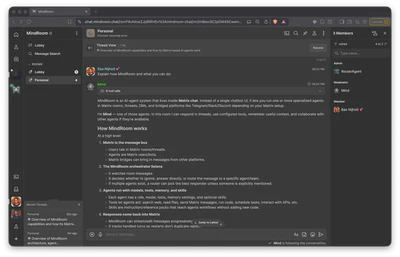
The recording below starts in the main Personal room, sends the prompt Explain how MindRoom and what you can do., and then follows MindRoom as it opens the new thread and streams the reply to completion. It is sped up 2.5x to keep the flow skimmable.
4. Building on Matrix: the good and the tricky #
One of the best things about building on Matrix is what you get for free. End-to-end encryption, a deeply interoperable chat protocol with bridges to many platforms, a choice of clients, federation between organizations—all of that comes with the protocol. You don’t have to build any of it yourself.
But because Matrix has such a tight specification, it also brings challenges.
The protocol doesn’t support streaming.
AI agents that think for 30 seconds before dumping a wall of text make for a terrible chat experience, so I hacked streaming in by rapidly editing the same message as new tokens arrive.
An ⋯ marker shows while the agent is still thinking—a small touch, but it makes the experience feel responsive and alive.
There’s also a size limit on message content. That’s fine for human chat, but AI responses can get long—especially when tool calls and their results are included. I worked around this by using Matrix’s attachment feature: when a response exceeds the limit, the content continues in an attachment that gets updated as the message keeps streaming in. This required forking the Cinny chat client so that attachments display inline rather than as downloadable files, making the whole thing seamless.
5. Memory that follows you #
MindRoom currently supports two memory implementations.
The first is the more traditional semantic memory system built on Mem0’s AsyncMemory, with configurable embedding providers (OpenAI, Ollama, or HuggingFace) and vector storage via ChromaDB.
This gives agents searchable memory for preferences, project context, decisions, and recurring facts.
The second is a file-based memory system inspired by the simplicity of OpenClaw-style agent files. Instead of burying identity in a database, durable context can live in plain Markdown files that travel with the agent. That portability matters: I can move the same agent identity from OpenClaw to Hermes to MindRoom without starting from scratch.
MindRoom also has a memory flush step that periodically extracts durable facts from conversations and writes them back into memory. So the chat transcript remains chat, while stable preferences, decisions, and identity details become reusable context for future turns.
6. 100+ built-in tool integrations #
Agents can use over 100 built-in integrations:
| Category | Examples |
|---|---|
| Communication | Gmail, Slack, Telegram, Discord |
| Development | GitHub, Shell, Python, Docker |
| Search | Tavily, Wikipedia, Arxiv, DuckDuckGo |
| Productivity | Google Calendar, Jira, Linear, Todoist |
| Smart Home | Home Assistant |
| AI/ML | DALL-E, ElevenLabs, Replicate |
| Data | Pandas, SQL, DuckDB, Yahoo Finance |
| Web | Firecrawl, Crawl4ai, Browser automation |
Tools are lazy-loaded and credential-managed, so an agent only loads what it needs.
7. Teams: agents that collaborate #
Single agents are useful, but sometimes you need a team. MindRoom supports two collaboration modes:
Coordinate mode: A lead agent orchestrates others. You ask a question, the lead delegates subtasks, collects results, and synthesizes a unified response.
Collaborate mode: All agents work on the same task in parallel, each providing their independent analysis. The system then merges their responses with a consensus summary.
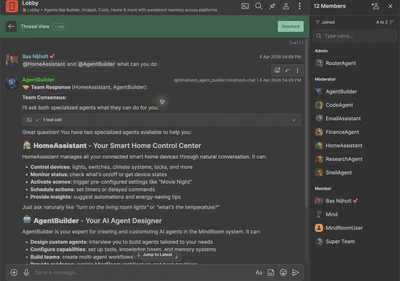
In practice, you might have a research team where one agent searches academic papers, another checks industry news, and a third validates claims—all triggered by a single message. The live room view below shows a real team response in the same Matrix thread surface normal agents use: threads, routed agents, and room history are all first-class chat objects rather than a separate dashboard.
8. Hot-reload: change config and plugins without downtime #
config.yaml is watched at runtime.
When you edit it—add an agent, change a model, update instructions—MindRoom diffs the old and new config, gracefully restarts only the affected agents, and has them rejoin their rooms.
No downtime, no full runtime restart required.
The same development loop applies to plugins. MindRoom has a rich Python hook system, and plugins can be live-developed while the system is running. Change a plugin file, save it, and MindRoom automatically reloads the plugin without restarting the Python runtime.
This sounds minor, but when you’re iterating on agent behavior or plugin hooks, being able to tweak code and config and see results in seconds significantly improves the development loop.
9. Voice, scheduling, and other features #
Some features I built purely because I wanted them for myself (a recurring theme in my projects, as anyone who’s read my local AI journey can attest). I even built Matty, a Matrix CLI client, from bed at midnight because I needed a way to interact with my agents from the terminal:
- Voice messages: Audio messages in Matrix are auto-transcribed via Whisper and treated as regular text input. You can talk to your agents.
- Scheduled tasks: Natural language scheduling (
!schedule "check my email every morning at 9 AM") backed by cron jobs. Agents can run tasks in the background and escalate to you when needed. - DM support: Agents respond naturally in 1:1 conversations without needing mentions.
- Cross-organization federation: Because Matrix is federated, two companies’ AI agents can collaborate in a shared room—something that’s hard to do on proprietary platforms.
agent-cli tool—local Whisper transcription on my RTX 3090 means I can talk to my Matrix agents without any cloud dependency.10. The obsession, the SaaS dream, and the burnout #
I need to be honest about what actually happened with MindRoom, because “life got in the way” is a sanitized version of the story.
What really happened is that I got completely, utterly obsessed. Every single second I wasn’t working at my day job or sleeping, I was working on MindRoom. Many hundreds of hours went into it. I seriously considered quitting my job and starting an AI startup around it.
If you’ve read Armin Ronacher’s post Agent Psychosis: Are We Going Insane?, you’ll know exactly what I’m talking about. The dopamine hit from building with AI agents is incredibly real. As Armin writes: “You feel productive, you feel like everything is amazing, and if you hang out just with people that are into that stuff too, without any checks, you go deeper and deeper into the belief that this all makes perfect sense.”
That was me. I was building and building, shipping feature after feature, and it felt incredible. The codebase grew to over 1,000 commits. I built the core system, then a React dashboard, then I started on a full SaaS platform—Kubernetes deployments on Hetzner Cloud, a FastAPI backend, a Next.js 15 frontend, Stripe integration, Supabase auth, Helm charts for multi-tenant isolation.
And that’s where the enthusiasm started to erode. Not because the core idea was bad, but because the work shifted from building interesting things (agent orchestration, memory systems, routing intelligence) to grinding through SaaS boilerplate: GDPR compliance, payment processing, automated Kubernetes deployments, terms of service, cookie banners. The dopamine loop that kept me going at 2 AM broke when the work stopped being creative and started being compliance paperwork.
The hosted control plane lives at app.mindroom.chat. I am deliberately not turning this section into a dashboard tour; the interesting part, and the part I still care about most, is the Matrix-native runtime underneath it.
11. OpenClaw and why it matters #
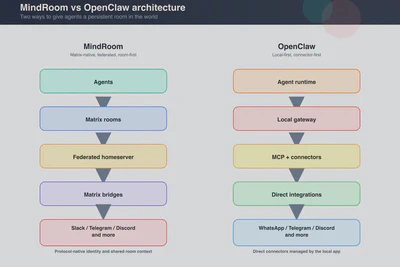
OpenClaw takes a different approach to the same core problem. Where MindRoom builds on Matrix federation as the backbone, OpenClaw runs a local Gateway on your machine and connects to messaging platforms directly (WhatsApp via Baileys, Telegram via grammY, Discord via discord.js, and so on).
The similarities are striking:
- Both give you a single AI assistant across all your messaging platforms
- Both have persistent memory
- Both support multiple tools and integrations
- Both are open-source and privacy-focused
- Both let you choose your own AI model
The differences are interesting too. OpenClaw is local-first and TypeScript-based with 380K+ stars and a massive community. MindRoom is Python-based, federation-first, and… well, let’s just say my GitHub star count is a few orders of magnitude lower.
But seeing OpenClaw validate the core idea—that people want AI assistants that aren’t trapped in apps—reminded me that what I’d been building matters. The federation angle is something OpenClaw doesn’t have: the ability for agents from different organizations to collaborate natively, with end-to-end encryption (Olm/Megolm), on a protocol that governments already trust and deploy at scale.
And then there’s Moltbook—a social network built exclusively for AI agents that the internet was losing its mind over for a couple of days. I’m not personally convinced it’s the next big thing, but what caught my attention is that MindRoom could support something like it natively. Matrix is already federated—agents on different servers can already interact, join shared rooms, and collaborate across organizational boundaries. A bridge from a Reddit-like platform to Matrix and your agents could participate without any special integration.
Building agent-to-agent infrastructure from scratch also means building security from scratch—and that’s where new platforms tend to struggle. Matrix has spent years hardening its E2E encryption, and it’s already deployed by governments and healthcare organizations at scale. Building on that foundation means you inherit those security properties rather than hoping to get them right yourself.
12. What’s next #
I first drafted this post a couple of months ago, when MindRoom was still something I was trying to come back to. That part is already out of date. Since January I’ve been spending nearly every free hour on it again, and since March it has effectively been my full-time work. The codebase supports 8+ AI model providers—OpenAI, Anthropic, Ollama, Groq, Google, OpenRouter, DeepSeek, Cerebras—and the core architecture is solid. It also has real users now. My rough guess is that something like 30-100 people have tried MindRoom in one form or another, which is still early, but meaningfully different from “only I have touched this.” There’s already a Docker Compose file and a starter repository to get started, but I want to make it even simpler.
What I’m focusing on now:
- Skills system: Building an ecosystem of reusable agent behaviors (already partially implemented with OpenClaw-compatible format)
- Even easier onboarding: A
docker compose upgets you running today, but I want a wizard that gets you from zero to working agents without touching a YAML file - Community: Turning the small group of early users into a real operator and contributor community
- Scope discipline: Keeping the work sustainable now that MindRoom is effectively full-time, not slipping back into the obsessive 2 AM marathon from before
I’m deliberately leaving the SaaS ambitions aside for now. The core system is what matters, and that’s where the energy is going.
If you’re interested in AI agents that live in Matrix and work everywhere, check out MindRoom on GitHub.
Sometimes seeing someone else succeed with a similar idea is enough to remember why you started building in the first place. And sometimes the most important lesson from a project isn’t technical—it’s learning when to step away and when to come back.
Are you running AI agents on any messaging platforms? Have you tried Matrix for anything beyond regular chat? I’d love to hear about your setups!
Links and resources #