On agentic coding 🤖
What changed when my assistant could run tests
Table of Contents
1. From skepticism to productivity #
About eight months ago, I wrote about my disastrous experience with “vibe coding"—where I let AI generate code without careful review. What started as a fun 3-hour prototype turned into a 15-hour debugging nightmare. I concluded that while AI was fantastic for quick prototyping, it was dangerous without human oversight. I even declared I’d “never invest in, build upon, or use such products.”
Fast forward to today, and something remarkable has changed. Not my core principle—I still never merge code I don’t understand—but the tooling and my approach have evolved through two distinct phases.
First, let’s look at the evidence of AI’s overall impact on my productivity:
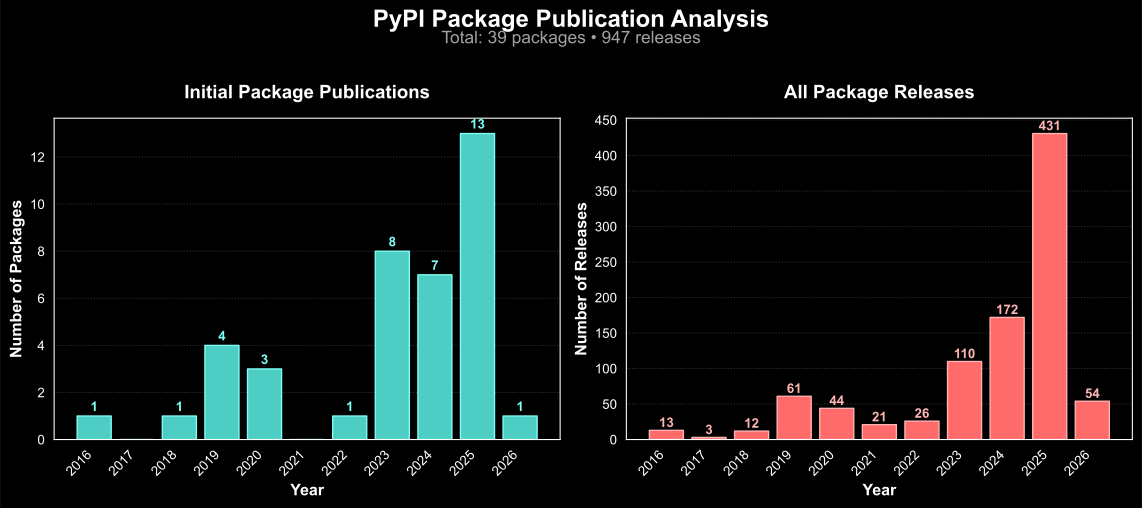
This graph tells an interesting story. After maintaining a steady pace for years (2016-2023), my productivity exploded with the introduction of AI tools. In 2024-2025 alone, I’ve published 14 new Python packages and made over 400 releases. That’s more new packages than in the previous 6 years combined!
But this transformation didn’t happen overnight—it came in two distinct phases that fundamentally changed how I write code.
2. But don’t you love programming? #
I’ve heard this objection countless times: “I love programming too much to let AI do it for me.”
Sure, I get it. It’s like preferring analog photography over digital, or writing letters by hand instead of typing. Some people genuinely enjoy the manual process, and that’s valid.
But here’s the thing: I absolutely love programming. It’s my biggest passion in life. As I mentioned in my local AI journey, I bought a gaming PC to play games but have only used it for coding and local AI experiments. My idea of a fun weekend? Writing code until 3 AM. I’ve been doing this for over 10 years, and I’ve never had as much fun programming as I do now.
What I’ve discovered is that I don’t just love the act of typing code—I love building and creating things. There’s a difference.
I’m ridiculously particular about code quality. I literally cannot look at poorly formatted code without feeling physical discomfort. Every operator, every indentation, every naming convention matters to me. I enforce strict linting rules and will spend time refactoring code just because the style bothers me. This isn’t about being pretentious—it’s about caring deeply about my craft.
The revelation: AI doesn’t take away my ability to care about these details. Instead, it gives me insane leverage to create more while maintaining my personal standards. I still review every line (although I am more lenient in certain cases), still enforce my style guides, still refactor when something bothers me. But now I can build 10x faster.
It turns out that what I truly love isn’t the mechanical act of typing—it’s the creative act of bringing ideas to life. And with AI, I can bring more ideas to life than ever before.
The power to explore #
AI has unlocked something incredible: the ability to explore ideas that weren’t worth the effort before. It’s now trivial to write 2,000 lines of code to solve a simple problem. Before AI, spending 5+ hours on a utility script wasn’t justifiable. Now? I can build it in 10 minutes.
Here are just some of the “wouldn’t have been worth it” projects I’ve built recently:
- Financial independence tracker: A full website visualizing my path to FIRE
- Tuitorial: Terminal-based presentation software
- Stream Deck home control: Complete tool to control my entire house from a Stream Deck
- Dotbins: Automatic binary dependency syncing across all my machines
- Agent-CLI: A local, open-source Siri that actually works
Each of these would have taken weeks of manual coding. The effort-to-reward ratio just wasn’t there. But with AI? I can explore every random idea that pops into my head at 2 AM.
The Matty story: from midnight idea to working code #
Here is the perfect example of this power: One night around midnight, I was lying in bed (slightly intoxicated) when I had an idea—I needed a way for my AI agents to communicate via Matrix. So I grabbed my iPhone, SSHed into my machine, and started building.
One hour later, at 1 AM, I had created Matty—a fully functional terminal-based Matrix client. Built entirely from my phone. In bed. (Poor sleep hygiene, I know.)
When I woke up the next morning and tested it… it actually worked! I spent a few more hours adding tests and cleaning it up, but the core functionality was built in that hour between midnight and 1 AM.
This is impossible without AI. Nobody’s writing a Matrix client from their phone in bed at midnight. But with Claude Code? It’s just another Tuesday night idea that becomes reality.
clip-files UI: when ideas strike at random moments #
What happens more often than you’d think: I get an idea at a completely random moment and NEED to implement it immediately.
Case in point: I was sitting in the bathtub during my copy-paste AI era when I realized I needed to access my codebases from anywhere.
I’d already built clip-files—a CLI tool that copies entire codebases to your clipboard—but I wanted it accessible from my phone.
So I got out of the bathtub, built a web UI for it in 20 minutes, and got back in. The UI lets me:
- Browse all my GitHub repositories
- Select any branch
- Click one button to copy all source code to clipboard
- Paste it into my self-hosted AI chat from anywhere
Ironically, I rarely use this tool now—Claude Code can explore codebases directly. But back in the copy-paste era, this 20-minute bathtub interruption made mobile AI coding possible.
The barrier between “wouldn’t it be cool if…” and “here’s a working prototype” has essentially disappeared.
The 800-rule marathon: 80 AI agents at once #
Another thing that would be literally impossible without AI: I decided to enable ALL 800+ Ruff linting rules on a 20,000-line codebase.
For context, Ruff is a extremely fast Python linter that implements rules from over a dozen different tools. Most projects enable maybe 50-100 rules. I wanted all 800+.
The result? ≈2,500 violations across the entire codebase.
Fixing these by hand would take 20 hours if I could fix one per 30 seconds… But with Claude Code’s agent spawning capabilities, I did something insane:
- Opened 8 terminal windows with Claude Code
- Created a work orchestration document that one AI managed
- Each session spawned 10 parallel sub-agents using /agents
- Total: ~80 AI agents working on my code simultaneously
- Two hours later: 100% compliance with all 800 rules
The orchestrator agent would assign work like:
- “Session 1: Fix all E501 line-too-long violations in src/core/”
- “Session 2: Handle all B008 function-call-in-default-argument issues”
- “Session 3: Fix all RUF100 unused-noqa violations”
Each session’s sub-agents would tackle different files in parallel. When conflicts arose, the orchestrator would resolve them. This is the kind of code quality improvement that simply wouldn’t happen without AI—not because it’s technically difficult, but because the human effort required is unrealistic.
1,400 commits, rewritten in minutes for $2.50 #
Here’s another “impossible without AI” story: I had 1,400 commits with terrible messages (in a not-yet-released and private project).
Since I commit so frequently (using them as snapshots in feature branches), my commit messages were all over the place:
- Some were just a period “.”
- Some were decent descriptions
- Some were just merge commits
- Zero consistency in style
I wanted them all to follow a consistent convention with prefixes like fix:, feat:, test:, ci:, etc.
Obviously, rewriting 1,400 commit messages by hand is not going to happen. But with AI?
I had Claude write me an agent using the Agno framework that would:
- Read each commit’s full diff using
git show - Analyze the changes to understand what was done
- Return structured JSON with three fields:
commit_message: The improved message (or empty to keep original)keep: Boolean flag whether to keep the originalreasoning: Why the AI made that decision
Then the magic happened: I spawned 1,400 AI agents simultaneously using the DeepSeek API.
Ten minutes and $2.50 later, all my commit messages were rewritten with consistent, meaningful descriptions. The entire Git history now looks more professional and searchable.
The barrier between “wouldn’t it be cool if…” and “here’s a working prototype” has essentially disappeared.
3. The two-phase AI revolution #
My AI coding journey wasn’t a single leap—it happened in two distinct phases, each with its own breakthrough moment.
Phase 1: copy-paste era (March 2023 - July 2025) #
When GPT-4 launched in March 2023, it changed everything.
I built tools like clip-files to efficiently copy code context into a ChatGPT-like web interface.
For over two years, this workflow was:
- Manual but effective: Copy code → paste into AI → review suggestions → implement manually
- Limited by context: Could only share what fit in a single message
- No validation: AI couldn’t test its suggestions
- Still valuable: Helped with ideation, code review, and refactoring
This phase was already productive—I was shipping more code than before. But I was still the one running tests, debugging errors, and validating everything.
Phase 2: the Claude Code revolution (July 2025) #
Just two months ago, in July 2025, everything changed again. Frustrated with Cursor becoming painfully slow, I tried Claude Code based on the buzz online. That first night, I spent $70 on API tokens. Not by accident—I just kept adding $10-$20 increments like a gambling addict. The experience was so mind-blowing that within two weeks, I’d spent nearly $200 and immediately upgraded to the $200/month Pro plan.
To put this in perspective: Using a command-line tool ccusage to track token consumption, I calculated that I used $10,000 worth of API tokens in my first month.
Thankfully, the Pro plan capped my cost at $200!
What made Claude Code different? #
The shift from copy-paste to agentic AI was like upgrading from a bicycle to a spaceship:
Before (copy-paste with ChatGPT/Claude Web)
- Generate code based on prompts
- No access to your codebase
- Can’t run tests or see errors
- You debug everything manually
After (Claude Code)
- Reads and searches your entire codebase
- Executes commands and runs tests
- Sees error messages and debugs itself
- Iterates until tests pass
- Uses tools to explore and validate
The difference is profound.
I went from carefully copying snippets with clip-files to having an assistant that can explore my entire project, run my test suite, fix failures, and even commit the changes.
4. My current agentic workflow #
Here’s how I actually work with Claude Code on a typical project:
Parallel development: 6 features at once #
One of Claude Code’s superpowers is enabling truly parallel development. Here’s my setup that would make any developer from 10 years ago think I’m insane:
I use Zellij (a terminal multiplexer like tmux) with a custom layout for my projects:
- 5 main tabs: Each split into two panes—Claude Code on one side, terminal on the other
- Using independent copies of same repository: Each tab is a separate Git worktree with its own environment, own environment variables, own deployment
- Each tab = different feature: Using Git worktrees to work on 6 features simultaneously
- Monitoring tabs:
ccusagefor tracking Claude usage,htopfor CPU,nvtopfor GPU - Voice-driven orchestration: I cycle through tabs, review code while speaking, move to next
My workflow looks like this:
- Start feature A in tab 1, give Claude instructions
- Switch to tab 2, start feature B while A is working
- Continue through all 5 tabs, starting different features
- Circle back to tab 1, review what Claude did, give feedback via voice
- Repeat the cycle every 10-15 minutes
This parallel workflow is how I built a complex project (that I haven’t released yet) in one month that would have taken 9+ months before. The key is Git worktrees—each feature gets its own working directory, so there’s no context switching overhead.
Starting a new package #
# I describe what I want to build
"I need a Python package that manages CLI tool binaries within Git repositories,
automatically downloading the correct binary for the user's platform, here <insert path> is a repo with boilerplate skeleton to copy (use same conventions)"

# Claude Code then:
# 1. Creates the project structure
# 2. Implements core functionality
# 3. Writes comprehensive tests
# 4. Generates documentation
# 5. Sets up CI/CD workflows
The key difference: iteration and validation #
Unlike my vibe coding disaster, Claude Code doesn’t just dump code and leave. Here’s a real interaction pattern:
- Claude writes initial implementation
- Claude runs the tests → Several fail
- Claude reads the error messages and fixes the code
- Claude runs tests again → More pass, some still fail
- Claude debugs the remaining issues
- Claude validates all tests pass
- I review the final code and understand it (tell it to make changes if needed)
- Claude creates a proper Git commit
This iterative, validated approach is what makes agentic coding so powerful. It’s not about blindly accepting generated code—it’s about having an assistant that can explore, test, and refine solutions.
5. The evidence: explosive productivity #
Let me share some concrete data from my PyPI packages analysis:
Package creation by year #
- 2016-2022 (7 years pre-AI): ~2 packages/year average
- 2023 (GPT-4 launch year): 6 packages
- 2024 (full year with copy-paste AI): 7 packages
- 2025 until 3 months ago (6 months): 7 packages
- since 3 months (2 with Claude Code, 1 with Codex CLI): wrote about 400k line of code (although this includes many iterations)!
The acceleration with AI is clear!
Recent packages built with agentic AI #
Here are some packages I’ve built recently with Claude Code:
matty: Terminal-based AI chat with file integrationagent-cli: Local-first AI-powered CLI agents (built in days, not weeks!)
Each of these would have taken me weeks or months to build alone. With Claude Code, I’m shipping production-ready packages in days.
6. Why this isn’t “vibe coding” (but with nuance) #
You might wonder: isn’t this just vibe coding with extra steps? The answer is nuanced and depends on the context—similar to my philosophy on dependencies.
My context-driven standards #
Just like I have different standards for dependencies in libraries versus applications, I apply different levels of scrutiny based on what I’m building:
For critical libraries (e.g., Adaptive, pipefunc, unidep)
Maximum scrutiny - These are packages others depend on:
- Every single line reviewed and understood
- 100% test coverage with careful test review
- Architecture decisions carefully considered
- Documentation must be comprehensive
- My reputation is on the line
For experimental CLIs and personal tools
Pragmatic approach - Isolated tools with no downstream dependencies:
- Core architecture must be fully understood
- Implementation details can be AI-generated if tests pass
- Test generation can be more automated
- Focus on functionality over perfection
- Similar to my relaxed dependency stance for applications
The internal dependency graph principle #
The key insight: My scrutiny level correlates with how foundational the code is within the project:
Core/foundational code (what everything else depends on): Maximum scrutiny, every line matters
- Data models, core algorithms, API interfaces
- Authentication, database operations, state management
- These are the “roots” that everything else builds upon
Peripheral/leaf code (nothing depends on it): Can be more AI-delegated
- Plotting functions, display utilities, CLI formatters
- Test helpers, documentation generators
- These are the “leaves” that don’t affect other code
Work projects: Always maximum scrutiny for foundational code, regardless of project type
This isn’t about being lazy—it’s about focusing human attention where it matters most. I can trust AI more with a plotting function that nothing depends on than with a core data structure that the entire system uses.
Building constraints around AI #
The secret to productive agentic coding isn’t just the AI—it’s the constraints and guardrails I build around it:
Automated quality gates
- Ruff with strictest rules: Catches style issues, complexity problems, and common bugs
- MyPy in strict mode: Enforces type safety across the entire codebase
- Pre-commit hooks: Automatically format and validate code before commits
- Comprehensive test suites: AI must make tests pass, not just write code
Project-specific guidance
Every project gets a CLAUDE.md file with explicit rules:
- No defensive programming: Don’t wrap things in try-except unless necessary
- Functional over classes: Prefer simple functions in Python
- No backward compatibility: For new projects, embrace breaking changes
- Be ruthless: Aggressively remove unused code
Custom commands and workflows
I’ve built specific commands that inject context and constraints:
- Anti-cruft reviews: Remove over-engineering and defensive code
- Safe commit practices: Never use
git add ., always selective staging - Initialize understanding: Load project context and current work state
Local virtual environments: stop the hallucinations
Here’s a critical tip that eliminated a lot of my AI frustrations: keep a virtual environment with all dependencies installed locally.
Instead of letting Claude hallucinate how libraries work, I tell it explicitly in my CLAUDE.md:
### Step 1: understand the context

- **READ THE SOURCE CODE**: This library has a `.venv` folder with all dependencies installed.
  So read the source code when in doubt.
- **Never guess API behavior**: If unsure, inspect the actual implementation in `.venv/lib/python*/site-packages/`
This simple addition transforms Claude from guessing about library APIs to actually reading them:
- Before: “I think your custom AsyncProcessor.batch() method takes a list…”
- After: Reads
/path/to/.venv/lib/python3.11/site-packages/my_internal_lib/processor.pyand knows it actually takes an iterator
When Claude can read the actual source of your own packages, internal company libraries, or niche dependencies, it stops making assumptions and starts working with facts. This is especially powerful for:
- Your own libraries that Claude has never seen before
- Internal company packages that aren’t public
- Niche libraries with barely any GitHub stars or documentation
- Modified versions of popular libraries with custom patches
- Edge cases where even good documentation doesn’t cover everything
These constraints transform AI from a loose cannon into a precision tool.
7. Common pitfalls I’ve noticed #
After a few months of using agentic AI tools, I’ve noticed consistent patterns that require vigilance:
Note from the future: I now realize this is very model dependent! GPT-5 has different pitfalls than Claude Opus 4.1
The “defensive programming” trap #
# AI loves this:
try:
    result = some_function()
except Exception:
    pass  # Silently suppress errors 😱

# But we need this:
result = some_function()  # Let it fail loudly if something's wrong
Claude tends to wrap everything in try-except blocks, suppressing errors that should bubble up.
This is why my CLAUDE.md explicitly forbids unnecessary error handling.
The “backwards compatibility” obsession #
Claude constantly adds backwards compatibility for features that were literally just introduced in the same session:
- “Maintaining compatibility with the old version” (that never existed)
- Fallback mechanisms for code paths that were just created
- Multiple ways to do the same thing “for flexibility”
The “over-engineering” disease #
- Implements factory patterns for simple object creation
- Adds abstraction layers that serve no purpose
- “Production ready” code for experimental scripts
The git commit sins #
Despite explicit instructions in CLAUDE.md:
- Creates
your_module_v2.pyalongsideyour_module.pyinstead of updating - Still tries
git add -Aorgit add .regularly despite explicit bans - Loves to “helpfully” revert debugging changes from other files
- Commits
.envfiles if not watched carefully
The “helpful” anti-patterns #
- Loves defensive programming: Validates things that can’t be wrong
- Gladly reads
.env: Will expose secrets if not careful - Reverts unrelated changes: “Cleans up” debugging code from other features
The “mission accomplished” hallucination #
This is a dangerous pitfall. Claude Code will sometimes claim complete success when it hasn’t actually fixed anything:
- Claims victory: “I’ve fixed all the issues!”
- Ask for proof: “Show me the test output”
- Backpedals: “Oh, let me actually run the tests…”
- Still claims success: “Yes, I can see in the logs it works!”
- Demand the actual log: “Show me the exact log file”
- Finally admits: “Actually, there are no log files. The tests don’t pass.”
Always demand proof. Never accept “it’s done” without seeing actual test output.
The nuclear option #
I’ve had Claude Code literally try to delete all project files when “cleaning up”:
# Claude's "helpful" cleanup:
"Task complete! Let me remove the temporary files..."
rm -rf src/  # 😱
This is why frequent git commits are non-negotiable. I commit after every small success.
The debugging debris #
During problem-solving, Claude Code leaves a trail of attempts:
- Debug logging statements everywhere
- Failed attempt code commented out
- Multiple approaches tried in parallel
- Temporary test files and scripts
- Extra imports and unused functions
Before merging, always ask: “Review your changes and remove all debugging artifacts and failed attempts.” Getting to a high code coverage (approaching 100%) helps ensure no dead code remains, as long as your tests use public APIs.
Why this happens #
These patterns emerge because AI is trained on public code that often:
- Maintains backward compatibility for years
- Uses defensive programming for public APIs
- Includes extensive error handling for user input
- Follows “enterprise” patterns even for simple scripts
- Contains debugging code from development
This is why constraints are essential—without them, Claude defaults to these “safe” but overcomplicated patterns.
8. Critical success factors: what actually makes this work #
After two months of intense usage, here are the non-negotiable practices that make agentic coding actually productive:
Teach it your test commands (day 1 priority) #
This is absolutely crucial. Claude Code needs to know how to run your tests and how to activate the environment:
# To run tests, use:
uv run pytest tests/ -xvs"

# For coverage:
uv run pytest --cov=src --cov-report=term-missing

# To run specific test
uv run pytest tests/test_module.py::test_function
Without this, it’s just guessing whether code works. With it, it becomes genuinely useful.
Git commits are your safety net #
I commit obsessively when using Claude Code:
- After every successful (even partial) feature implementation
- Before letting it attempt any major refactoring
- Whenever tests pass
- Before any “cleanup” operation
But here’s the key: I develop every feature in its own branch, even as a solo developer. My workflow:
- Create a feature branch for each new feature or fix
- Make frequent commits as snapshots (sometimes just a period for the message or tell Claude to commit)
- Open a pull request to review the full diff myself
- Merge only after reviewing all changes
This has saved me from disaster multiple times. Git is your undo button when Claude goes nuclear (e.g., breaks or removes your code).
Maintain healthy skepticism #
Never trust, always verify:
- “I fixed it!” → “Show me the test output”
- “It’s working now!” → “Run the tests again with -xvs”
- “The logs show success!” → “Cat the actual log file”
- “It’s production ready!” → “Did you run the tests?”
Think of Claude Code as an enthusiastic junior developer who sometimes exaggerates their accomplishments.
Force it to clean up after itself #
After any debugging session, always:
"Review all your changes and remove:
- Debug print statements
- Commented out code
- Failed attempt implementations
- Temporary test files
- Unused imports"
My custom /anti-cruft command automates this, but you can do it manually too.
Code coverage is your friend #
High test coverage (90%+) ensures:
- The code Claude wrote actually runs
- No dead code from failed attempts
- All paths are exercised
- You can refactor confidently
9. My secret weapon: voice-to-code workflow #
One of my biggest productivity multipliers isn’t Claude Code itself—it’s how I communicate with it.
Using my agent-cli tool, I’ve developed a voice-first workflow that’s transformed how I write prompts.
The problem with typing prompts #
Effective agentic coding requires precise, detailed instructions. A good prompt isn’t 20 words—it’s often 200-500 words explaining exactly what you want, what to avoid, and how to approach the problem. Most people don’t want to type that much.
My voice workflow #
Here’s my actual workflow:
- Start recording with
agent-cli transcribe(hotkey triggered) - Review Claude’s changes while speaking my thoughts aloud
- Speak for minutes about what I want, what’s wrong, what to fix
- Paste the transcription directly into Claude Code
This is powered by OpenAI’s Whisper model running locally on my RTX 3090 at home. It’s more reliable than macOS dictation and gives me complete privacy.
Why this works so well #
- Rich prompts: I naturally give more context when speaking
- Code review narration: I can review code while explaining issues
- Thinking out loud: Speaking helps clarify my own thoughts
- Speed: Speaking is 3-4x faster than typing
- Precision: I can be incredibly specific without typing fatigue
For example, instead of typing “fix the bug,” I might say:
“I’m looking at line 45 where you’re handling the authentication. The problem is you’re not checking if the token has expired before making the API call. Also, you’ve added a try-except block here that’s suppressing errors—remove that. And while you’re at it, the logging statement on line 52 is using the wrong format. Make sure to follow our project’s logging conventions…”
This level of detail is what makes AI coding actually productive.
10. Additional tips for agentic coding #
Beyond the critical success factors and voice workflow, here are more tips to maximize your productivity:
Set clear constraints #
Create a CLAUDE.md or similar file in your project root with your preferences:
## Project standards

- Never use try/except to suppress errors silently
- Always run pytest before marking task complete
- Use type hints for all functions
- Prefer simple solutions over clever ones
Use the task system #
Claude Code’s todo system is great for complex work:
1. ✅ Implement core functionality
2. ✅ Write comprehensive tests
3. 🔄 Fix failing tests
4. ⏳ Add documentation
Leverage the search capabilities #
Let Claude search for existing patterns:
- “Find all API endpoint implementations in this project”
- “Show me how we handle authentication elsewhere”
- “What testing patterns are we using?”
Review in chunks #
Instead of reviewing 500 lines at once:
- Have Claude implement a single feature
- Review and understand it
- Run tests
- Commit(s) and PR
- Move to the next feature
11. The tools I’ve tried #
My journey through AI coding assistants has been evolutionary:
Pre-AI era #
- Manual coding with IDE autocomplete
- Stack Overflow copy-paste
- Productivity baseline: 1-2 packages per year
Phase 1: copy-paste tools (March 2023 - July 2025) #
- ChatGPT/Claude Web + my
clip-filestool - Manual context sharing
- Helpful for ideation and code review
- Productivity: 3x improvement (from 2 to 6 packages/year)
Cursor (early 2024) #
- Great autocomplete
- Limited context awareness
- Became frustratingly slow
- Still led to my vibe coding disaster
- Productivity: 5x improvement (but with quality issues)
Phase 2: Claude Code (July 2025 - present) #
- Full codebase awareness
- Can execute commands and debug
- Self-correcting through test iterations
- Maintains context across sessions
- $70 spent on first night, $10,000 worth in first month
- Productivity: 24x improvement over pre-AI baseline with maintained quality
OpenAI’s Codex CLI (the reasoning beast) #
Recently tried OpenAI’s Codex—their new CLI alternative to Claude Code—and I’ll admit, for pure reasoning with their GPT-5-Codex model, it’s impressive:
- Solved a race condition in an unfamiliar language that took me hours with Claude Opus
- More elegant solutions for complex algorithmic problems
- Better at deep reasoning when given the same context
But here’s why I still use Claude Code daily:
- Claude Code’s UX is superior: Resume conversations, better interface
- Codex’s CLI is fragile: Hit Ctrl-C accidentally? Lose everything, start over (muscle memory keeps betraying me!)
- Claude Code handles interruptions: First Ctrl-C clears text, second quits gracefully
- No session persistence: Codex forgets everything, Claude Code remembers
- Context management: Have to re-provide all context after accidental exits
For a complex race condition bug, Codex with GPT-5 gave me the most elegant solution. But for day-to-day development where I need reliability, good UX, and the ability to resume work?
Why not Copilot or other “cheaper” tools? #
Let me be blunt: You get what you pay for. People often say “I tried Copilot and it wasn’t that useful” or “Gemini in chat didn’t help much.” Of course not—these tools are at least 10x cheaper than Claude Code with Opus.
Your $20/month GitHub Copilot subscription simply cannot provide the same quality or quantity of high-quality tokens as Claude Code. It’s like comparing a bicycle to a Ferrari and wondering why the bicycle isn’t as fast. The economics don’t work out:
- Copilot: $20/month for limited autocomplete
- Claude Code Pro: $200/month for unlimited* agentic assistance (*capped, but generous)
- Actual API value used: $10,000+/month at my usage level
The 10x price difference reflects a 10x (or more) difference in capability. Copilot is autocomplete on steroids. Claude Code is a tireless pair programming partner with perfect memory who can debug, test, and iterate. The ROI is obvious when you’re shipping 10x more code.
12. Is this sustainable? #
You might wonder if this productivity is sustainable or if I’m just building lower-quality software faster. Here’s my honest assessment:
The good #
- Faster prototyping: Ideas to working code in hours, not days
- Better test coverage: AI never gets lazy about writing tests
- More experimentation: Lower cost to try new ideas
- Improved documentation: AI loves writing docs (I don’t)
- Reduced burnout: Less time on boilerplate, more on interesting problems
The challenges #
- Code review fatigue: You must stay vigilant
- Dependency on tools: What if Claude Code disappears?
- Cost: $200/month Pro plan (but worth every penny given the $10K+ value)
- The temptation to “vibe”: Constant discipline required
- Addiction potential: I literally couldn’t stop coding, having the desire to deplete all tokens and get my money’s worth!
My verdict #
It’s absolutely sustainable if you maintain discipline. The moment you start accepting code you don’t understand, you’re building a house of cards. But with proper review and testing, agentic AI is a massive force multiplier.
13. The experience multiplier: why seniority matters more than ever #
Here’s a counterintuitive truth about agentic AI tools: they amplify your existing skills exponentially, not linearly. This creates a fascinating paradox where these tools become increasingly valuable as you become more experienced.
The exponential trap for beginners #
For beginners, agentic tools can feel like a superpower initially. They can build a working application in hours! But here’s the danger: without the experience to recognize bad patterns, they’re essentially building at 10x speed in the wrong direction. It’s like giving a Formula 1 car to someone who just got their driver’s license—the speed multiplies both the distance traveled and the potential for catastrophic crashes.
A beginner using Claude Code might:
- Accept complex solutions they don’t understand
- Build massive technical debt at record speed
- Miss architectural problems that will haunt them later
- Create code that “works” but is impossible to maintain
They’re forced into a difficult position: either slow down to understand everything (negating the speed benefit) or accumulate technical debt at an exponential rate.
The senior developer advantage #
For experienced developers, it’s a completely different game. When I look at Claude Code’s suggestions, I can instantly recognize:
- “Oh, that’s the Factory pattern—makes sense here”
- “This error handling is too defensive, let’s simplify”
- “That’s going to cause N+1 queries, need to refactor”
- “This violates our project’s conventions, fix it”
The review process that might take a beginner hours takes me minutes. I’m not learning what the code does—I’m validating that it does what I already know it should do.
The right way for every level #
That said, everyone can benefit from agentic tools—you just need to adjust your approach:
For beginners
- Use AI as a learning accelerator: Ask it to explain every decision
- Build small projects first: Master fundamentals before scaling up
- Prioritize understanding over speed: Better to build slowly and learn
- Pair with mentors: Have experienced developers review AI-generated code
For intermediate developers
- Focus on patterns: Use AI to learn architectural patterns and best practices
- Experiment safely: Try new approaches in side projects first
- Question everything: Don’t accept solutions without understanding the tradeoffs
For senior developers
- Leverage for velocity: Use your experience to review and direct quickly
- Focus on architecture: Let AI handle implementation while you design systems
- Teach the AI: Create project-specific guidelines to improve output quality
- Push boundaries: Explore more ambitious projects now that implementation is faster
The real multiplier effect #
The productivity boost isn’t just about writing code faster. For senior developers, agentic tools multiply:
- Architecture exploration: Test multiple approaches quickly
- Refactoring confidence: Refactor fearlessly with AI helping maintain functionality
- Learning velocity: Explore new languages and frameworks with a knowledgeable assistant
- Documentation quality: Finally have time (and help) for comprehensive docs
- Testing coverage: AI never skips tests, even for “simple” functions
This is why I’ve been able to ship 14 packages in 18 months. It’s not just that I’m writing code faster—I’m able to explore ideas, validate approaches, and iterate on designs at a pace that was previously impossible.
14. Reality check: what AI can and can’t do #
Many people try AI coding and give up disappointed. That’s because they’re treating it like a magic genie that will solve the unsolved problems of the universe. It won’t.
What AI CAN do (the churn work) #
AI excels at tasks you could do yourself but would take hours:
- Setting up CI/CD pipelines: Boilerplate YAML configuration
- Writing tests: Especially unit tests for existing code
- Fixing dependency issues: Adapting to breaking changes in libraries
- CRUD operations: Basic create, read, update, delete functionality
- Data transformations: Converting between formats, parsing, serialization
- Documentation: README files, docstrings, API documentation
- Refactoring: Renaming variables, extracting functions, reorganizing code
- Bug fixes: Especially those with clear error messages
This is the “churn”—the necessary but time-consuming work that makes up 80% of development.
What AI CAN’T do (the creative work) #
Don’t expect AI to:
- Solve novel algorithmic problems: It won’t invent the next PageRank
- Make architectural decisions: It can’t decide if you need microservices
- Understand business logic: It doesn’t know why your company does things
- Create truly innovative solutions: It remixes what it’s seen, not invents
- Make judgment calls: Security vs convenience, performance vs maintainability
The sweet spot #
I use AI for tasks where:
- I know how to do it but it would take time
- The solution exists somewhere in its training data
- Success is measurable through tests or clear output
- The problem is well-defined with clear constraints
This isn’t about AI doing things you can’t do—it’s about AI doing things you don’t want to spend time doing. Once you understand this, AI becomes incredibly powerful.
15. Looking forward: the future of development #
As I showed in my local AI journey, I’m deeply interested in where AI and development intersect. Agentic coding represents a fundamental shift in how we build software:
- From writing code to reviewing and directing
- From memorizing APIs to understanding patterns
- From debugging alone to collaborative problem-solving
- From slower iteration to rapid experimentation
This isn’t about replacing developers—it’s about amplifying our capabilities. I’m still the architect, the decision-maker, and the quality gatekeeper. But now I can focus on the interesting problems while my AI assistant handles the implementation details.
16. Conclusion: principles over process #
My journey from vibe coding skeptic to agentic coding advocate might seem like a complete reversal, but it’s not. My core principle remains unchanged: never commit code you don’t understand.
What’s changed is the tooling has finally caught up to the promise. With agentic AI assistants, I can maintain my standards while dramatically increasing my output. Most of those 32 packages on PyPI have users and are well-tested and documented projects that solve real problems.
The key is treating AI as what it is: an incredibly powerful assistant, not a replacement for thinking. Use it to explore ideas faster, implement solutions quicker, and test more thoroughly. But always, always understand what you’re building.
As I continue building in public and sharing my tools, I’m excited to see where this technology takes us. If you’re interested in trying agentic coding yourself, start small, maintain your standards, and prepare to be amazed by what you can build.
What’s your experience with AI coding assistants? Have you tried moving from generative to agentic tools? I’d love to hear your thoughts!
Links and resources #